Chapter 2 - Number System
Comprehensive Questions & Answers for Class 9 Computer Science (Punjab Board)
Purpose of ASCII Encoding Scheme
ASCII stands for American Standard Code for Information Interchange. The primary purpose of ASCII encoding is to represent characters, including letters, numbers and Symbols, using a standardized System that computer can understand.
For example:
The ASCII code of the character "n" is 110.
Difference between ASCII and Unicode
| ASCII | Unicode |
| ASCII is an acronym for American Standard Code for Information Interchange. It is an industry standard used to encode text in computers and other devices. | Unicode is a character encoding Standard that aims to provide character codes for all the characters used in the World's writing Systems. |
| ASCII is a 7-bit encoding System that can represent 128 characters. | Unicode can represent over a million characters through different forms of encodings. |
How Unicode Handles Different Languages
Unicode assigns a unique numerical value to each character, regardless of the language it belongs to. This allows computers to handle text from various languages consistently. Each character is represented by a specific code point, ensuring compatibility across different Systems and languages.
Example:
The letter "A" is unicode, represented as: U+0041, is 01000001 in the binary format and occupies 8 bits or 1 byte.
Range of Unsigned 2-byte Integer
An unsigned 2-byte integer can represent values from 0 to 65,535. This is because each byte has 8 bits, and 2 bytes make up 16 bits, resulting in 216 possible combinations.
Example:
The letter "A" in UTF-16 is equal to 000000001000001 in binary or 65 in decimal (2 bytes).
Representation of Negative Integer in Binary
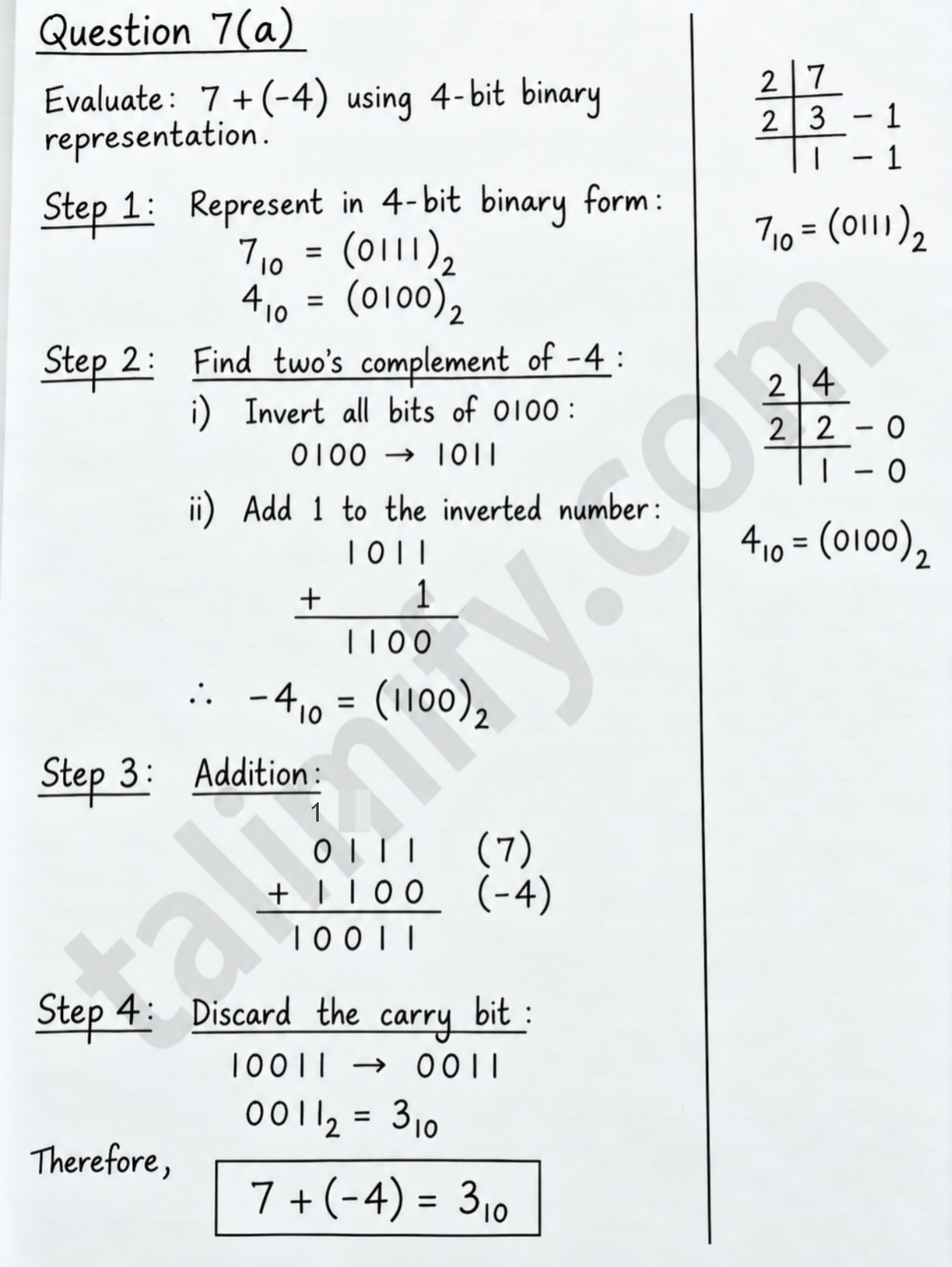
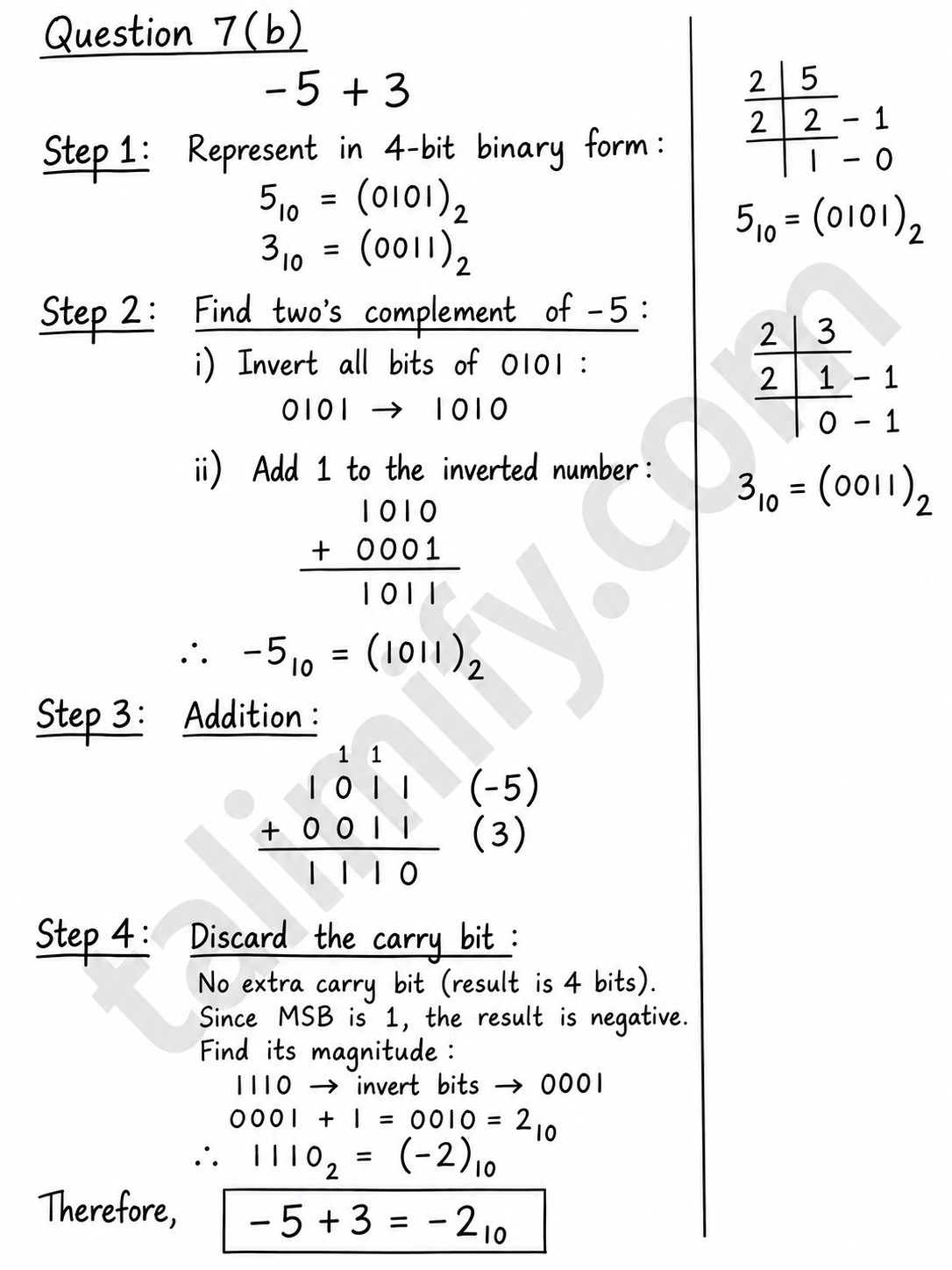
Negative integers are typically represented using two's complement in binary.
To find the two's complement of a binary number, follow these Steps:
- Invert all the bits (change 0s to 1s and 1s to 0s).
- Add 1 to the least significant Bit (LSB).
Example:
Let's convert the decimal number -5 to an 8-bit binary number:
- Start with the binary representation of 5: 00000101₂
- Invert all the bits: 11111010₂
- Add 1: 11111010₂ + 1₂ = 11111011₂
So, -5 in 8-bit two's complement is 11111011₂.
Benefit of Using Unsigned Integers
Unsigned integers use all bits to represent positive values only, offering a larger range of positive values compared to signed integers. Unsigned integers are used where negative values are not needed, such as counting or representing memory addresses.
Example / Benefits:
- Increased Range
- Memory Efficiency
- Improved Performance
- Error Detection
- Counting pixels in an image
Effect of Number of Bits on Integer Range
The number of bits in a binary representation determines the possible range of values that an integer can represent. Each bit can hold a value of 0 or 1.
A 1 byte integer has 8 bits to store values. If all 8 bits are on, it represents the maximum value, 11111111₂, which is 255₁₀. If all bits are off, it represents the minimum value, 00000₂, which is 0₁₀.
Use of Whole Numbers in Computing
Whole numbers are a set of non-negative numbers. They include zero and all the positive integers. W = {0,1,2,3,....}
In Computing, whole numbers are often used to represent quantities that can't be negative.
Examples:
- The number of students in a school.
- A person's age in years and grades, provided there are no negative figures such as credit point balance.
Range of Single Precision Floating-Point Numbers
The range of a floating-point number is determined by the number of bits used to represent the exponent and mantissa.
For single precision (32 bits), 8 bits are used for the exponent and 23 bits for the mantissa. The exponent can be ranged between -126 and +127.The approximate range of values from 1.4×10⁻⁴⁵ to 3.4×10³⁸
Importance of Floating-Point Limitations in Scientific Computing
Floating-point numbers (real values) are represented similarly to Scientific notation. A floating-point number = Sign x mantissa x 2^exponent represented as 1.4375×2². Understanding the limitations of floating-point representation in Scientific computing is crucial because computers can only represent real numbers with a limited precision.
How Characters Are Encoded Using Unicode?
Unicode:
Unicode is an attempt at mapping all graphic characters used in any of the world's writing systems. Unicode can represent over a million characters through different forms of encodings such as UTF-8, UTF-16 and UTF-32. UTF stands for Unicode Transformation Format.
UTF-8:
It is a variable-length encoding scheme, meaning it can use a different number of bytes (from 1 to 4) to represent a character. UTF-8 is backward compatible with ASCII. It means it can understand and use all ASCII characters. The sign bit is the most significant bit. If the sign bit is 1, the value is negative; otherwise, it is positive.
How Integers Are Stored In Computer Memory?
Positive integers are directly converted into binary and stored in memory.
1. Positive Integers:
Positive integers can be stored in computer by directly converted into binary form.
Example: 13₁₀ = 1101₂
In 8-bit system, it can be written as 00001101
2. Negative Integers:
There are three different methods to store negative numbers but most commonly used method is 2's complement method:
Steps to store -13:
- Write positive number in binary form : 13 = 00001101
- Take 1's Complement : By converting all 0's to 1 and 1 to 0 → 11110010
- Then add 1 : 11110010 + 1 = 11110011
So, -13 will be stored in memory in the form of 11110011.
3. Sign Bit Concept:
The leftmost bit is called the Most Significant Bit (MSB) and it tells whether the number is positive or negative.
| MSB | Meaning |
| 0 | Positive Number |
| 1 | Negative Number |
Example in 8-bit:
00000101 = +5
11111011 = -5
4. Fixed Size Storage:
Integers are stored in a fixed number of bits:
- 8-bit / 1 Byte: Range -128 to +127
- 16-bit / 2 Bytes: Range -32,768 to +32,767
- 32-bit / 4 Bytes: Range -2,147,483,648 to +2,147,483,647
If a number is outside this range, an overflow occurs.
Reasons of using 2's Complement:
- Only one circuit is needed for both addition and subtraction
- There is only one representation of zero: 00000
- Subtraction becomes addition: A - B = A + (-B)
Conversion from Decimal to Binary & Binary to Decimal
Conversion from decimal to binary:
The following algorithm translates a decimal number to binary. To convert a decimal number to binary:
- Divide by 2: Divide the decimal number by 2.
- Record Remainder: Record the remainder.
- Repeat Division: Divide the quotient by 2 until the quotient which is left after division is 0.
- Read Result: The binary number is represented by the remainders and it is read from the bottom to the top.
Example 1: Convert 83 to Binary
83 / 2 = 41 Remainder = 1
41 / 2 = 20 Remainder = 1
20 / 2 = 10 Remainder = 0
10 / 2 = 5 Remainder = 0
5 / 2 = 2 Remainder = 1
2 / 2 = 1 Remainder = 0
1 / 2 = 0 Remainder = 1
Reading from bottom to top: (83)₁₀ = (1010011)₂
Binary to Decimal Conversion:
We use the "Place Value" method.
Steps:
- Write the place values of each bit from right to left: 128, 64, 32, 16, 8, 4, 2, 1
- Multiply each bit by its place value
- Add all the values where bit = 1
Example 2: Negative Decimal → Binary using 2's Complement
Convert -13₁₀ to binary in 8-bit
- Convert +13 to binary: 13 = 00001101
- Take 2's Complement and invert all values : 11110010
- Then add 1: 11110010 + 1 = 11110011
So, -13₁₀ = 11110011₂
Example 1: Positive Binary → Decimal
Convert 101111₂ to decimal ⁰ ¹ ² ³ ⁴ ⁵ ⁶ ⁷ ⁸ ⁹
1 0 1 1 1 1
1 x 2⁵ 0 x 2⁴ 1 x 2³ 1 x 2² 1 x 2¹ 1 x 2⁰
32 + 0 + 8 + 4 + 2 + 1 = 47
So, 101111₂ = 47₁₀
Example 2: Negative Binary → Decimal using 2's Complement
Convert 11110011₂ to decimal. MSB = 1 so it's negative.
- Take 2's Complement to get positive value:11110011 → invert all values then add 1 = 00001100 → +1 = 00001101
- 00001101₂ = 8 + 4 + 1 = 13₁₀
- Since original MSB was 1, it was negative.
So, 11110011₂ = -13₁₀
Multiplication & Division of Binary Numbers
a). 101₂ x 1₂
1 0 1 ← 101₂ = 5 in decimal
x 1 1 ← 11₂ = 3 in decimal
-------
1 0 1 ← 101₂ x 1₂
+ 1 0 1 0 ← 101₂ x 1₂, left shifted
----------
1 1 1 1
So, 101₂ x 11₂ = 1111₂
b). 1100₂ / 10₂
1 1 0 ← Quotient
--------
10 | 1 1 0 0 ← Dividend
-1 0
-----
1 0
-1 0
-----
0 0
- 0
------
0 ← Remainder
Result: 1100₂ / 10₂ = 110₂
Steps:
- Compare 10 with first two bits 11 → 10
- Subtract 10 from 11 = 1
- Bring down next digit 0
- Compare 10 with 10
- Subtract 10 from 10 = 0
- Bring down last digit 0 → Remainder 0
Binary Numbers Addition
a).
1 0 1
+ 1 1 0
------- (Remember that: 0+0=0 , 0+1=1 , 1+0=1 , 1+1=10)
1 0 1 1
So, answer is 1011₂.
b).
1 1 0 0
+ 1 0 1 1
---------
1 0 1 1 1
So, answer is 10111₂.
4-bit Binary Representation