Chapter 7 - Computational Thinking
Comprehensive Questions & Answers for Class 9 Computer Science (Punjab Board)
Computational Thinking
Computational thinking (CT) is a problem-solving process that involves a set of skills and techniques to solve a complex problems in a way that can be executed by a computer.
Decomposition in CT
Decomposition in CT:
Decomposition is an important step in computational thinking. It involves dividing a complex problem into smaller manageable tasks.
Example:
Let's take the example of building a birdhouse. This task might look tough at first, but if we break it down, we can handle each part at a time.
Pattern Recognition
Pattern Recognition:
Pattern recognition involves looking for similarities or patterns among and within problems. For instance, if you notice that you always forget your homework on Mondays, you might recognize and set a reminder specially for sunday.
Explanation:-
Patterns recognition is an essential aspect of computational thinking. It involves identifying and understanding regularities or patterns in the areas of problems.
Example:-
Let's consider the example of recognizing patterns in the areas of squares.
- Side Length 1: Area = 1² =1
- Side Length 2: Area = 2² =4 (1+3)
- Side Length 3: Area = 3² =9 (1+3+5)
- Side Length 4: Area = 4² =16 (1+3+5+7)
- Side Length 5: Area = 5² =25 (1+3+5+7+9)
- Side Length 6: Area = 6² =36 (1+3+5+7+9+11)
- Side Length 7: Area = 7²=49 (1+3+5+9+11+13)
The areas of squares increase by adding consecutive odd numbers.
Abstraction and Its Importance
Abstraction:
Abstraction is the process of hiding the complex details while exposing only the necessary parts. It helps reduce complexity by allowing us to focus on the high-level overview without getting lost in the details.
Importance in problem-solving:-
Abstraction is a fundamental concept in problem solving, especially in computer science. It involves simplifying complex problems by breaking them down into smaller, more manageable parts, and focusing only on the essential details while ignoring the unnecessary ones. This help in understanding, designing, and solving problems more efficiently.
"Algorithm" Definition and Example
Algorithm:
An algorithm is a precise sequence of instructions that can be followed to achieve a specific goal, like a recipe or a set of directions that tells you exactly what to do and in what order.
Example:-
How to bake a cake:-
1- Preheat the oven
2- Gather the ingredients
3- Measure out the ingredients.
4- Mix together the ingredients to make the batter
5- Grease a pan.
6- Pour the batter into the pan.
7- Put the pan in the oven.
8- Set a timer.
9- When the timer goes off, take the pan out of the oven.
10- Enjoy!
Importance of "Understanding the problem"
Understanding the problem is the first and the most important step in problem-solving, especially in computational thinking. This involves thoroughly analyzing the problem to identify its key components and requirements before attempting to find a solution. "If I had an hour to solve a problem I'd spend 55 minutes thinking about the problem and 5 minutes thinking about solutions" - Albert Einstein
Flowchart and Its Uses
Flowcharts:
Flowcharts are visual representations of the steps in a process or system, depicted using different symbols connected by arrows.
Uses:-
They are widely used in various fields, including computer science, engineering, and business, to model processes, design systems, and communicate complex workflows clearly and effectively.
Purpose of Pseudocode
Purpose of pseudocode:
Pseudocode is not actual code that can be run on a computer, but rather a way to describe the steps of an algorithm in a manner that is easy to follow. It helps programmers and students focus on the logic of the algorithm without worrying about the syntax of a specific programming language.
Pseudocode vs Flowcharts
| Pseudocode | Flowcharts |
| Pseudocode uses plain language and structured format to describe the steps of an algorithm. | Flowcharts use graphical symbols and arrows to represent the flow of an algorithm. |
| Uses | |
| It is particularly useful for documenting algorithm in a way that can be easily converted into actual code in any programming language. | They are useful for identifying the steps and decisions in an algorithm at a glance. |
Dry run and Its Importance
Dry run:
A dry run involves manually going through the algorithm with sample data to identify any errors.
Importance:-
- Error detection: This helps identify any logical errors and understand the flow of control.
- Improved efficiency: This helps in verifying the logic and correctness of the algorithm.
LARP and Its Significance
Definition:
LARP stands for Logic of Algorithms for resolution of Problems. It is a fun and interactive way to learn how algorithms work by actually running them and seeing the results.
Significance:
- Understand how algorithms work.
- See the effect of different inputs on the output.
- Practice writing and improving your own algorithms.
Debugging Techniques
Debugging:
Debugging is the process of finding and fixing errors in an algorithm or flowchart.
Techniques:-
Here are two common debugging techniques:
- Check Conditions: Ensure that all conditions in decision steps are correct.
- Simplify the problem: Break down the algorithm into smaller parts and test each part separately.
Algorithm for Grading System / Grade Assignment Algorithm
Here is an algorithm to assign a grade based on the marks obtained by a student:
Algorithm:
1- Input: Read the student's marks.
2- Condition Check:
- If marks >=90, assign grade "A+".
- Else if marks >=80, assign grade "A".
- Else if marks >=70, assign grade "B".
- Else if marks >=60, assign grade "C".
- Else, assign grade "F".
3- Output: Display the assigned grade.
Pseudocode:
BEGIN
Input marks
IF marks >= 90 THEN
grade = "A+"
ELSE IF marks >= 80 THEN
grade = "A"
ELSE IF marks >= 70 THEN
grade = "B"
ELSE IF marks >= 60 THEN
grade = "C"
ELSE
grade = "F"
ENDIF
PRINT grade
END
Example:
- For marks = 85, the grade will be "A".
- For marks = 72, the grade will be "B".
- For marks = 55, the grade will be "F".
Algorithm Design Methods (Flowchart & Pseudocode)
Algorithm Design Methods:
Algorithm design methods provide a range of tools and techniques to tackle various computational problem effectively. Each method has its strengths and weaknesses, making it suitable for different types of problems. Understanding different methods allows one to choose the most appropriate approach for a given problem, leading to more efficient and elegant solutions. Let's discuss two of these methods.
1. Flowcharts:-
Flowcharts are visual representations of the steps in a process or system, depicted using different symbols connected by arrows.Uses:-
They are widely used in various fields, including computer science, engineering, and business, to model processes, design system, and communicate complex workflows clearly and effectively.
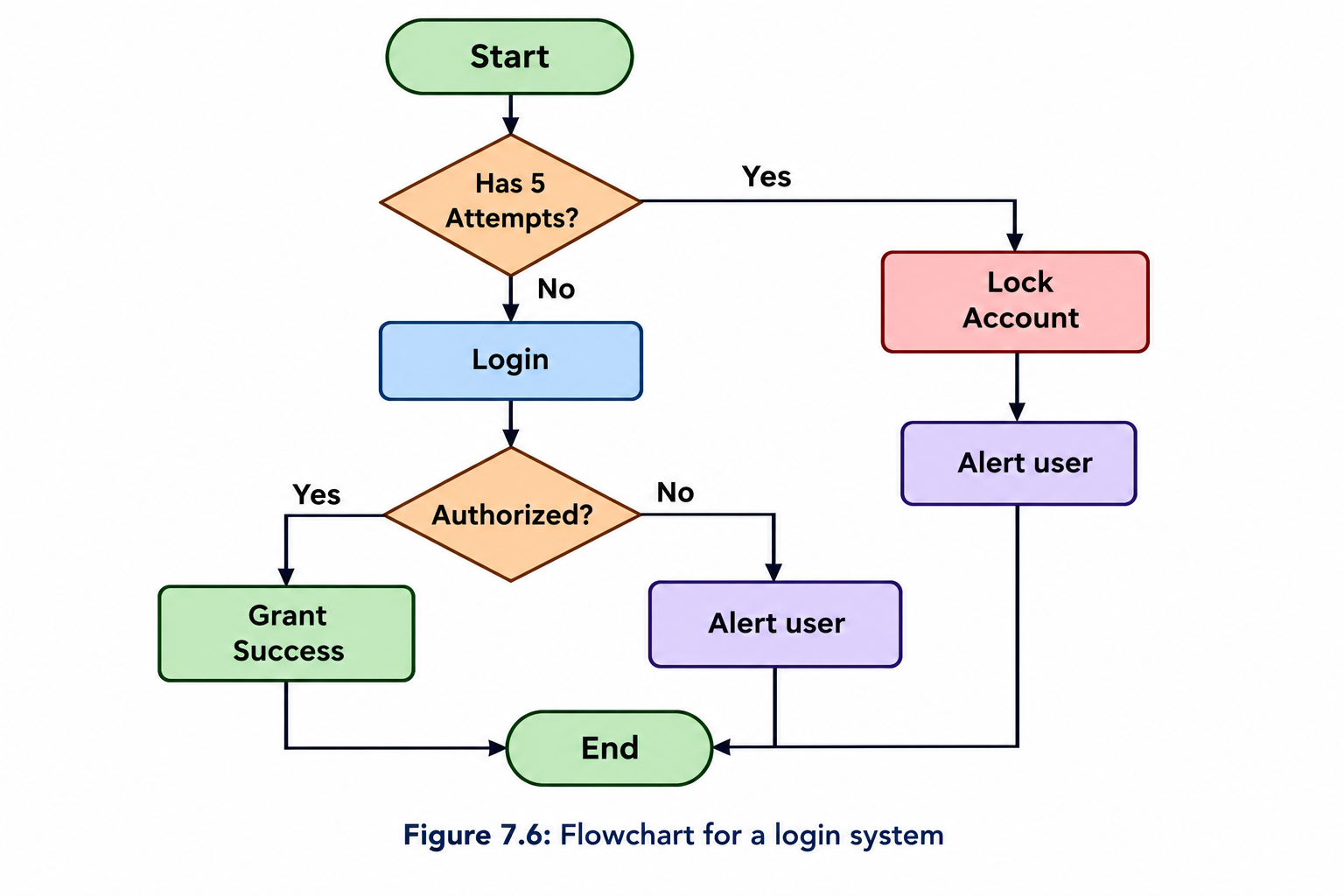
Example of flowcharts:-
A flowchart for a login system steps such as inputting a username and password, verifying credentials, and granting access shown in Figure. 7.6 user can make a maximum of five attempts.
2. Pseudocode:
Pseudocode is a method of representing an algorithm using simple and informal language that is easy to understand. It combines the structure of programming clarity with the readability of plain English, making it a useful tool for planning and explaining algorithms.
Uses in computational thinking:
Pseudocode is not actual code that can be run on a computer, but rather a way to describe the steps of an algorithm in a manner that is easy to follow. It helps programmers and students focus on the logic of the algorithm without worrying about the syntax of a specific programming language.
Example:-
Determining whether a number is even or odd is a fundamental task in programming and computer science. An even number is divisible by 2 without any remainder, whereas an odd number has a remainder of 1 when divided by 2. Below is the pseudocode for this process, followed by an explanation.
Algorithm 1: Pseudocode for determining if a number is even or odd.
1: Procedure Check Even Odd (number)
2: Input: number (The number to be checked)
3: Output: "Even" if number is even, "Odd" if number is odd.
4: Begin
5: if (number % 2 == 0) then
6: print "Even"
7: else
8: print "Odd"
9: End if
10: End
Explanation:
1. Procedure Declaration: The pseudocode begins with the declaration of the procedure 'Check Even Odd' which takes a single input, 'number'.
2. Input: The procedure accepts a variable 'number' which is the integer to be checked.
3. Output: The procedure outputs "Even" if the number is even, and "Odd" if the number is odd.
4. Begin: Marks the start of the procedure.
5. Condition Check: The condition 'if (number % 2 == 0)' checks if the remainder of the number when divided by 2 is zero. The modulo operator '%' is used for this purpose.
6. Even case: If the condition is true, the procedure prints "Even".
7. Odd case: If the condition is false, the procedure prints "Odd".
8. End: Marks the end of the procedure.
Computational Thinking - Definition, Significance & Applications
Computational Thinking:-
Computational thinking (CT) is a problem solving process that involves breaking down complex problems into smaller, manageable parts and approaching them with methods and technique derived from computer science. It involves key elements like decomposition, pattern recognition, abstraction, and algorithm design.
- Decomposition: Breaking a complex problem into smaller, more manageable parts.
- Pattern Recognition: Identifying similarities or pattern among smaller problems to simplify the solution.
- Abstraction: Focusing on important information and ignoring irrelevant details.
- Algorithm Design: Developing step-by-step instructions to solve the problem.
Significance in Modern problem solving:
Computational thinking is important in today's world because many problems, regardless of the domain, require an organized and efficient approach to find solution. With the rise of technology and data-driven decisions, computational thinking helps to improve critical thinking skills, enhance problem-solving efficiency and ensure scalable solutions in various industries.
Examples of computational thinking in Different Fields:
1. Healthcare:
- Problem: Diagnosing a disease based on patient symptoms and medical history.
Application:
- Decomposition: Break down the disease into smaller categories (e.g., respiratory issues, digestive problems, etc).
- Pattern Recognition: Look for patterns in symptoms to match common diseases.
- Abstraction: Focus on the most relevant medical indicators while ignoring irrelevant data.
- Algorithm Design: Create predictive models using algorithm like regression or machine learning to forecast stock prices.
- Outcome: Better investment decision based on predictions derived from data analysis.
2. Education:
- Problem: Designing an adaptive learning system for students.
Application:
- Decomposition: Break down the curriculum into manageable learning modules.
- Pattern Recognition: Identify the learning behaviors or struggles of different students.
- Abstraction: Focus on the key learning objectives and ignore unnecessary complexities.
- Algorithm Design: Develop an algorithm that personalizes lessons based on the student's progress.
- Outcome: Customized learning experiences, improving student engagement and understanding.
3. Environmental Science:
- Problem: Modeling climate change impact.
Application:
- Decomposition: Break the climate model into smaller systems like temperature change, sea-level rise, or carbon emissions.
- Pattern recognition: Analyze historical climate data to identify patterns in temperature shifts, weather anomalies, etc.
- Abstraction: Focus on significant environmental factors (e.g., green house gas emissions) and exclude irrelevant data.
- Algorithm Design: Create predictive models using algorithm to forecast future climate changes.
- Outcome: Better understanding of climate change and informed policy-making for environmental protection.
4. Business and operations:
- Problem: Optimizing supply chain logistics.
Application:
- Decomposition: Break down the supply chain into parts like procurement, transportation, and inventory.
- Pattern Recognition: Look for patterns in sale, stock levels, or delivery times.
- Abstraction: Ignore specific details about individual product or suppliers to focus on key factors like demand or location.
- Algorithm Design: Develop algorithms for demand forecasting, inventory management and route optimization.
- Outcome: Reduced costs, efficient resource allocation, and timely delivery.
Conclusion: Computational thinking provides a structured way to find optimal solutions across diverse fields.
Decomposition and its Importance in Computational Thinking
Decomposition:
Decomposition is the method of breaking down a complex problem into smaller, more convenient components.
Importance in computational thinking:
Decomposition is an important step in computational thinking. It involves dividing a complex problem into smaller, manageable tasks. Let's take the example of building a birdhouse. This task might look tough at first, if we break it down, we can handle each part one at a time.
Decomposed tasks for building a birdhouse:-
Here's how we can decompose the task of building a birdhouse:
- Design the Birdhouse: Decide on the size, shape, and design. Sketch a plan and gather all necessary measurements.
- Gather Materials: Lists all the materials needed such as wood, nails, paint, and tools like hammer and saw.
- Cut the wood: Measure and cut the wood into the required pieces according to the design.
- Assemble the Pieces: Follow the plan to assemble pieces of wood together to form the structure of the birdhouse.
- Paint and Decorate: Paint the birdhouse and add any decorations to make it attractive for birds.
- Install the Birdhouse: Find a suitable location and securely install the birdhouse where birds can easily access it.
Pattern Recognition in the Context of Computational Thinking
Pattern recognition:
Pattern recognition involves looking for similarities or patterns among and within problems. For instance, if you notice that you always forget your homework on Mondays, you might recognize a pattern and set a reminder specially for sundays.
Context of computational thinking:
Pattern recognition is an essential aspect of computational thinking. It involves identifying and understanding regularities or patterns within a set of data or problems.
Pattern Identification:
Let's consider the example of recognizing patterns in the areas of squares.
The upper row in figure represents the side length of squares, ranging from 1 to 7. The lower row shows the corresponding areas of these squares. Here, we can observe a pattern in how the areas increase.
- Side length 1: Area = 1² = 1
- Side length 2: Area = 2² = 4 (1 + 3)
- Side length 3: Area = 3² = 9 (1 + 3 + 5)
- Side length 4: Area = 4² = 16 (1 + 3 + 5 + 7)
- Side length 5: Area = 5² = 25 (1 + 3 + 5 + 7 + 9)
- Side length 6: Area = 6² = 36 (1 + 3 + 5 + 7 + 9 + 11)
- Side length 7: Area = 7² = 49 (1 + 3 + 5 + 7 + 9 + 11 + 13)
We can see that the area of each square can be calculated by adding consecutive odd numbers. For example, the area of a square with a side length of 3 can be found by adding the first three odd numbers: 1 + 3 + 5 = 9
Figure: Visual / Numerical Pattern
Goes up by 1
| Side | 1 | 2 | 3 | 4 | 5 | 6 | 7 |
| Area | 1 | 4 | 9 | 16 | 25 | 36 | 49 |
Goes up by consecutive odd numbers starting at 3.
+3, +5, +7, +9, +11, +13
Abstraction (Definition, Explanation, Importance and Example)
Abstraction is the process of hiding the complex problems while exposing only the necessary parts. It helps reduce complexity by allowing us to focus on the high-level overview without getting lost in details.
Explanation:
Abstraction is a fundamental concept in problem solving, especially in computer science. It involves simplifying complex problems by breaking them down into smaller, more manageable parts, and focusing only on the essential details while ignoring the unnecessary one. This helps in understanding, designing, and solving problems more efficiently.
Importance:
When solving complex problems, try to break them down into smaller parts and focus on the main steps. This will helps you understand the problem's better and find a solution more easily. By using abstraction, we can tackle complex problems by dealing with them at a higher level.
Example :
Making a cup of tea
High level steps :
1- Boil water
2- Add tea leaves or tea bag.
3- Steep for a few minutes
4- Pour into a cup and add milk/sugar if desired.
Algorithm and Its Role in Computational Thinking
Algorithm:
An algorithm is a precise sequence of instructions that can be followed to achieve a specific goal, like a recipe or a set of directions that tells you exactly what to do and in what order.
Role in computational thinking:
Logarithms play a key role in computational thinking by optimizing algorithms and improving efficiency. They help in:
1- Algorithm complexity: Used in analyzing time complexity
2- Data structures: Efficient operations in trees, heaps and search algorithms.
3- Divide and conquer: Improves sorting and problem-solving.
4- Compression & Encoding: Used in Huffman coding for data compression.
5- Machine learning & Big Data: Applied in logistic regression and scaling large datasets.
Example:-
An algorithm is a step-by-step section of instruction to solve a problem or complete a task similar to following a recipe to bake a cake.
How to bake a cake:-
- Preheat the oven.
- Gather the ingredients.
- Measure out the ingredients.
- Mix together the ingredients to make the batter.
- Grease a pan.
- Pour the batter into the pan.
- Put the pan in the oven.
- Set a timer.
- When the timer goes off, take pan out of the oven.
- Enjoy!
Flowchart:
( Start )
↓
[ Preheat oven ]
↓
[ Gather ingredients ]
↓
[ Mix ingredients ]
↓
[ Grease pan ]
↓
[ Pour batter on Pan ]
↓
[ Put pan in oven ]
↓
[ Set timer ]
↓
[ Take pan out of oven ]
↓
( Enjoy )
Contrast between Flowchart and Pseudocode
Contrast between flowchart and pseudocode:
Flowcharts and pseudocode are both tools used to describe algorithms, but they do so in different ways.
| Pseudocode | Flowchart |
| Definition | |
| Pseudocode uses plain language and structured format to describe the steps of an algorithm. | Flowchart use graphical symbols and arrows to represent the flow of an algorithm. |
| Representation | |
| It is read like a story, with each step is written out sequentially. | It is like watch a movie, where each symbol (such as rectangles, diamonds, and oval) represents a different type of action or decision, and arrows indicate the connection and direction of the flow. |
| Communication | |
| Pseudocode communicates the steps in a detailed narrative-like format. | Flowchart communicates the process in a visual format which can be more intuitive for understanding the overall flow and structure. |
| Use | |
| It is particularly useful for documenting algorithms in a way that can be easily converted into actual code in any programming language. | They are useful for identifying the steps and decisions in a algorithm at a glance. |
Advantages of a flowchart:
- Easy to draw.
- Easy to understand problem solving.
- Easy to identify errors (if any).
- Easy to observe flow from one step to the other.
Disadvantages of a flowchart:
- More time is required to draw a flowchart.
- Modifying a flowchart is not very easy every time.
- It is not suitable for very large problem.
Advantages of Pseudocode:
- Easy to understand.
- Platform Independence
- Improved communication
- Faster debugging / reduce errors.
Disadvantages of Pseudocode:
- Translating pseudocode into actual code can be time consuming, especially for large or complex algorithm.
- Writing effective pseudocode may not requires expertise in programming and algorithm design.
- Pseudocode may not capture the nuances and subtleties of actual code.
Concept of Dry run in Context of Flowchart and Pseudocode
Dry Run:
A dry run involves a manually going through the algorithm with sample data to identify any errors.
Dry run of flowchart:
A dry run of a flowchart involves manually walking through the flow chart step-by-step to understand how the algorithm works without using a computer. This helps identify any logical errors and understand the flow of control.
Dry run of pseudocode:
A dry run of pseudocode involves manually simulating the execution of the pseudocode line-by-line. This helps in verifying the logic and correctness of the algorithm.
Dry run help in validating the correctness of an algorithm:
Performing a dry run helps validate the correctness of an algorithm by simulating its execution step by step, often with a specific set of inputs without actually running the code on a computer. This process allows you to manually trace through the algorithm's logic, identify any mistakes, and verify that is behaves as expected. It help you to:
1- Check logic errors: By walking through each steps, you can spot mistakes in the algorithm, like incorrect conditions, missing steps, or wrong calculations.
2- Understand the flow: It helps you understand how the algorithm handles different cases, especially edge cases.
3- Verify correctness: You can verify if the expected output is produced for the given input, ensuring the algorithm functions as intended.
4- Catch inefficiencies: A dry run can also help you identify inefficient steps that may not be obvious just by looking at the code.
In summary, a dry run provides a simple yet effective way to mentally validate an algorithm's functionality and correctness before actual implementation or testing.
LARP (Definition and Importance)
LARP:
LARP stands for Logic of Algorithms for resolution of Problems. It is a fun and interactive way to learn how algorithms work by actually running them and seeing the results.
Importance:
- Understand how algorithms work.
- See the effect of different inputs on the outputs.
- Practice writing and improving your own algorithms.
Importance in learning and practicing algorithm:-
LARP (Listen, Analyze, Reflect, and Practice) is a highly effective approach for learning and practicing algorithms, particularly in programming and computer science. Let's break down its importance:
1. Listen - Understanding Algorithm Concept:
- Listening to lecture, tutorials or explanations helps in grasping fundamental algorithmic concept.
2- Analyze - Breaking Down Problems:
- Understanding an algorithm is not enough learner must analyze problems, break them into subproblems and determine the best approach to solve them.
Practice:
- Consistent practice leads to improved speed and accuracy in problem-solving.
LARP is Effective for Learning Algorithms:
- Encourages active learning rather than passive memorization.
- Helps develop a structured approach to solving problems.
- Enhances critical thinking and problem-solving skills.
- Makes learning algorithms more engaging and efficient.
By following LARP, learners not only understand algorithms better but also develop the confidence and skillset needed for coding interviews, competitive programming, and real-world applications.
LARP and Its Importance in Computational Thinking Principals
LARP helps in writing algorithm by:
i- Simplified syntax: It uses a clear structure that starts with a START command and ends with an END command, making it easy to follow.
ii- Basic Command: It uses straightforward commands like WRITE for displaying messages, READ for input values, and conditional statements (If... Then.... ELSE) for decision-making.
iii- Focus on Logic: By breaking down complex problems into manageable steps, LARP helps learners focus on the logical flow of the algorithm without getting bogged down by complex coding syntax.
iv- Enhancing Problem-Solving Skills: This method encourages clear and logical thinking, improving problem-solving abilities.
START
WRITE "Enter a number"
READ number
If number % 2 == 0 Then
WRITE "The number is even"
ELSE
WRITE "The number is odd"
ENDIF
END
Drawing flowcharts:
Drawing flowcharts in LARP helps in understanding algorithms by:
i- Visual Representation: It uses standard flowcharts symbols (rectangle for processes, diamond for decision and parallelograms for input/output operations) to represent algorithms steps visually
ii- Step-by-Step Execution: Once the flowchart is created, it is translated into LARP syntax using commands like START, WRITE, READ, IF... THEN... ELSE and END. This allows students to visualize the logic of the algorithm and see its step-by-step execution.
iii- Hands-on Learning: By executing the flowcharts, students can verify its correctness and reinforce their understanding of how the flowcharts works. This method enhance practical comprehensions and problem-solving skills.
Importance of Error Identification and Debugging in LARP:
i- Error identification: Errors or bugs in algorithms or flowcharts can prevent correct execution. Identifying these mistakes is essential to ensure algorithms functions properly.
ii- Debugging Process: Debugging involves finding and fixing errors in the algorithm. It helps improve the functionality and efficiency of the algorithm.
iii- Ensure Correctness: Debugging ensures that the algorithm works as intended, leading to accurate results. This process enhances problem-solving skills and ensure the reliability of the algorithm.
Types of Errors in LARP:
i- Syntax Errors: These occurs when there is some mistake in writing the algorithm or flowcharts, such as missing steps or using incorrect symbols.
ii- Runtime in LARP: These happens during the execution of the algorithm, such as performing an operation that is not possible, like dividing by zero.
iii- Logical Errors: These errors occurs in logic of the algorithm, causing it to behave incorrectly, like using the wrong condition in decision step